{
"$type": "site.standard.document",
"content": {
"$type": "at.markpub.markdown",
"flavor": "gfm",
"text": {
"$type": "at.markpub.text",
"markdown": "#### Accessing your funds directly through the ctez smart contracts.\n\n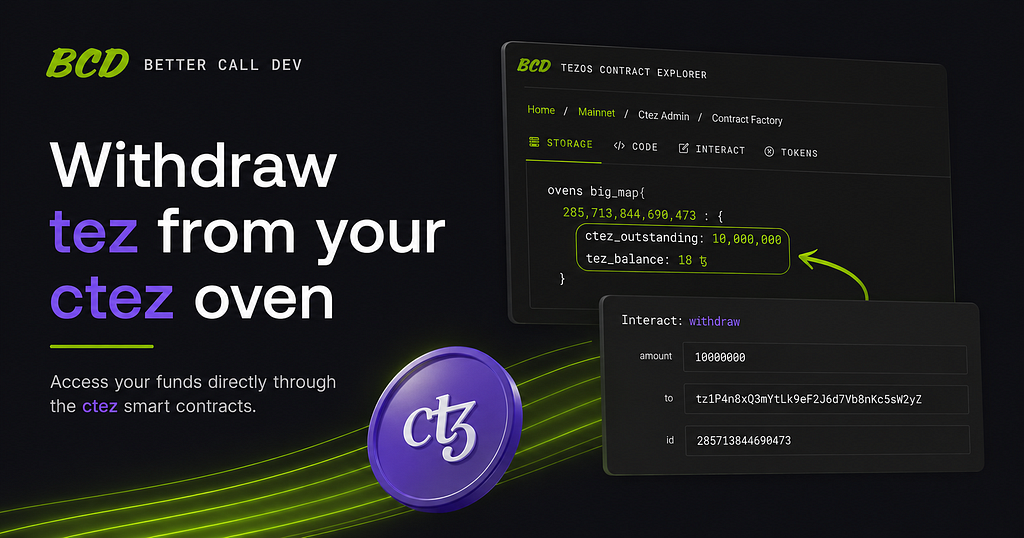\n\nAs the ctez frontend approaches retirement, some of the users may need to interact directly with the ctez smart contracts to withdraw any remaining funds from their ovens.\n\nThis step-by-step guide will walk you through the process of finding your oven details, burning any outstanding ctez if necessary, and withdrawing the tez held within the oven using Better Call Dev.\n\nBefore you begin, make sure you have access to the wallet that owns the oven, as you will need it to sign the required transactions.\n\n#### Step 1: Find Your Oven Details\n\nFirst, we need to locate our oven and gather the information needed for the remaining steps.\n\n- Go to [https://better-call.dev/mainnet/KT1GWnsoFZVHGh7roXEER3qeCcgJgrXT3de2/storage](https://better-call.dev/mainnet/KT1GWnsoFZVHGh7roXEER3qeCcgJgrXT3de2/storage)\n- Open the “ovens” Big Map\n\n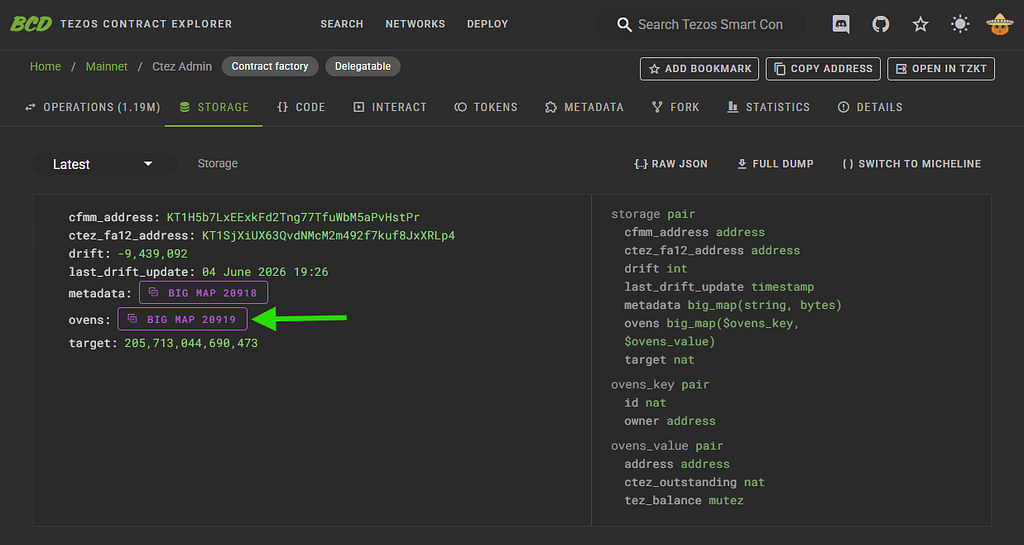\n\n- Enter your wallet address into the search field.\n\n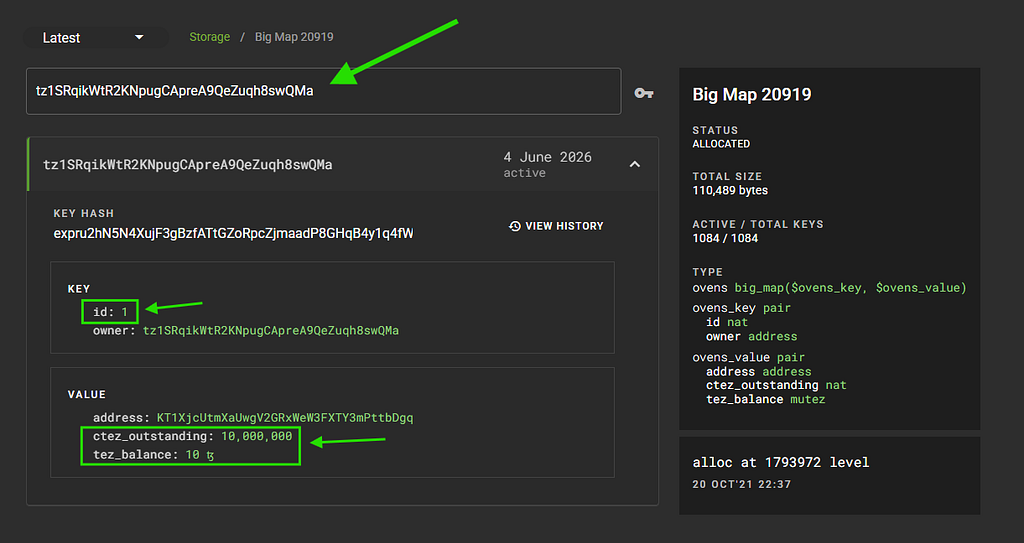\n\n- Open the oven associated with your address and note down the following values: \n \\- **Oven ID** \n **- ctez\\_outstanding** \n **- tez\\_balance**\n\nYou will need these values for the next steps.\n\n#### Step 2: Burn Any Outstanding ctez\n\nIf your oven has any outstanding ctez debt, it must be burned before the tez can be withdrawn. If your oven’s **ctez\\_outstanding** value is **0**, you can skip this step and go directly to Step 3.\n\n- Go to [https://better-call.dev/mainnet/KT1GWnsoFZVHGh7roXEER3qeCcgJgrXT3de2/interact/mint\\_or\\_burn](https://better-call.dev/mainnet/KT1GWnsoFZVHGh7roXEER3qeCcgJgrXT3de2/interact/mint_or_burn)\n- Enter your **Oven ID** in the **id** field.\n- In the **quantity** field, enter the amount shown as **ctez\\_outstanding**, but with a minus sign (-) in front of it. For example, if your oven shows **ctez\\_outstanding: 10,000,000**, enter **-10000000**.\n\n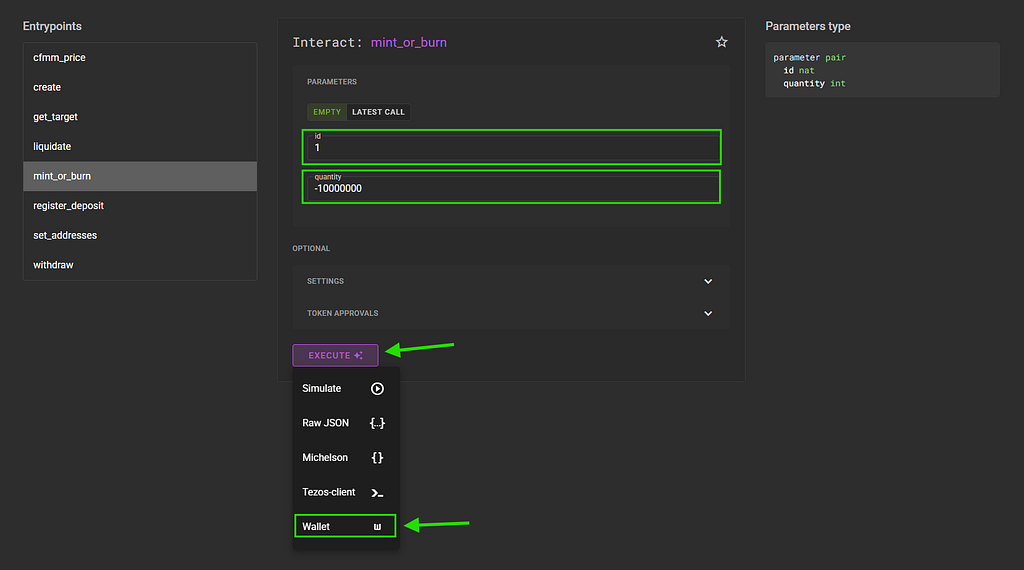\n\n- Make sure your wallet holds at least the amount of ctez specified above, then click **Execute,** then **Wallet**, connect your wallet, and submit the transaction.\n\n#### Step 3: Withdraw Your Tez\n\nOnce any outstanding ctez has been burned, you can withdraw the tez held in your oven.\n\n- On the same page, click the **“withdraw”** entrypoint on the left of the screen.\n- In the **amount** field, enter your oven’s **tez\\_balance** in mutez. Tez uses 6 decimal places, meaning **1 tez = 1,000,000 mutez**. For example, if your oven’s **tez\\_balance** is **10 tez**, enter **10000000.**\n- In the **to** field, enter your wallet address.\n- Enter your **Oven ID** in the **id** field.\n- Click **Execute,** then **Wallet**, connect your wallet, and submit the transaction.\n\n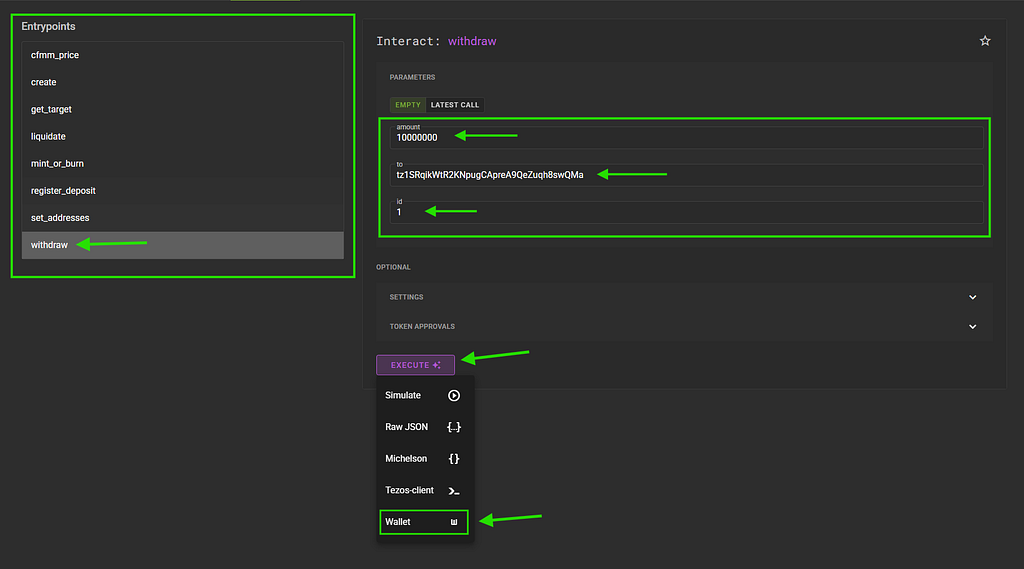\n\nOnce the withdrawal transaction has been confirmed on-chain, the tez will be sent to the address specified in the withdrawal step.\n\nIf the withdrawal operation fails, try submitting the transaction again with a slightly smaller amount than your oven’s displayed **tez\\_balance**.\n\nIf you run into any issues, you can ask for help in the Tezos [**Discord**](http://discord.gg/tezos) or [**Telegram**](https://t.me/tezosplatform). As always, be cautious of scammers and impersonators. Never share your seed phrase, private keys, or wallet credentials with anyone.\n\n\n\n* * *\n\n[How To Withdraw Your Tez From A ctez Oven Using Better-Call-Dev](https://news.tezoscommons.org/how-to-withdraw-your-tez-from-a-ctez-oven-using-better-call-dev-3878e4b22529) was originally published in [Tezos Commons](https://news.tezoscommons.org) on Medium, where people are continuing the conversation by highlighting and responding to this story."
}
},
"contributors": [
{
"did": "did:plc:tqbzcpxwjjsbktjazvk6yzyq",
"displayName": "Cryptonio.tez",
"role": "author"
}
],
"description": "As the ctez frontend approaches retirement, some of the users may need to interact directly with the ctez smart...",
"path": "/2026/06/15/how-to-withdraw-your-tez-from-a-ctez-oven-using-better-call-dev-q56nlz",
"publishedAt": "2026-06-15T19:31:57Z",
"site": "at://did:plc:g5gsxwj5oi2odrjrt3hyayot/site.standard.publication/3moo6jmztyi2g",
"tags": [
"smart-contracts",
"blockchain",
"ctez",
"tezos",
"cryptocurrency"
],
"textContent": "Accessing your funds directly through the ctez smart contracts. As the ctez frontend approaches retirement, some of the users may need to interact directly with the ctez smart contracts to withdraw any remaining funds from their ovens. This step-by-step guide will walk you through the process of finding your oven details, burning any outstanding ctez if necessary, and withdrawing the tez held within the oven using Better Call Dev. Before you begin, make sure you have access to the wallet that owns the oven, as you will need it to sign the required transactions. Step 1: Find Your Oven Details First, we need to locate our oven and gather the information needed for the remaining steps. Go to https://better-call.dev/mainnet/KT1GWnsoFZVHGh7roXEER3qeCcgJgrXT3de2/storage Open the “ovens” Big Map Enter your wallet address into the search field. Open the oven associated with your address and note down the following values: - Oven ID - ctez_outstanding - tez_balance You will need these values for the next steps. Step 2: Burn Any Outstanding ctez If your oven has any outstanding ctez debt, it must be burned before the tez can be withdrawn. If your oven’s ctez_outstanding value is 0 , you can skip this step and go directly to Step 3. Go to https://better-call.dev/mainnet/KT1GWnsoFZVHGh7roXEER3qeCcgJgrXT3de2/interact/mint_or_burn Enter your Oven ID in the id field. In the quantity field, enter the amount shown as ctez_outstanding , but with a minus sign (-) in front of it. For example, if your oven shows ctez_outstanding: 10,000,000 , enter -10000000 . Make sure your wallet holds at least the amount of ctez specified above, then click Execute, then Wallet , connect your wallet, and submit the transaction. Step 3: Withdraw Your Tez Once any outstanding ctez has been burned, you can withdraw the tez held in your oven. On the same page, click the “withdraw” entrypoint on the left of the screen. In the amount field, enter your oven’s tez_balance in mutez. Tez uses 6 decimal places, meaning 1 tez = 1,000,000 mutez . For example, if your oven’s tez_balance is 10 tez , enter 10000000. In the to field, enter your wallet address. Enter your Oven ID in the id field. Click Execute, then Wallet , connect your wallet, and submit the transaction. Once the withdrawal transaction has been confirmed on-chain, the tez will be sent to the address specified in the withdrawal step. If the withdrawal operation fails, try submitting the transaction again with a slightly smaller amount than your oven’s displayed tez_balance . If you run into any issues, you can ask for help in the Tezos Discord or Telegram . As always, be cautious of scammers and impersonators. Never share your seed phrase, private keys, or wallet credentials with anyone. How To Withdraw Your Tez From A ctez Oven Using Better-Call-Dev was originally published in Tezos Commons on Medium, where people are continuing the conversation by highlighting and responding to this story.",
"title": "How To Withdraw Your Tez From A ctez Oven Using Better-Call-Dev",
"updatedAt": "2026-06-15T19:31:57Z"
}