{
"$type": "site.standard.document",
"content": {
"$type": "site.standard.content.markdown",
"text": "import Stackblitz from '../../components/mdx/Stackblitz.astro'\n\nHave you ever wondered how Next, Sveltekit, Nuxt (even Expo now) do their routing? What's the magic that makes it so when you create a file called `+page.svelte` in a directory called `routes`, just for it to magically works? Well, wonder no more! I'll show you how to build your own file-based router for [express](https://expressjs.com/) in Javascript, though the concepts we'll see are usable in other frameworks and other languages. This article will focus on parsing files, ignoring folders (because that is a whole of grenades I'm not yet ready to step - and write - on). Let's get to it!\n\n\n\n## How file routing works\n\nFirst, let's start by saying what file-based routing is and how it works.\nUsually, a function will loop through the `routes` folder (ever noticed how you always have a single place where you place your `pages`? this avoid crawling the whole project directory every time your app starts), getting all the files matching a certain pattern (for svelte, that will be `+page.svelte`) and, based on their location in the folder, determines what requests should be sent to it. The first part of this series, as specified above, will not be handling folders; instead, we will just do a basic file router; here's how it'll work:\n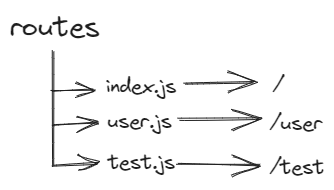\n\nThis means that when we'll call our function, it will step through our route directory and generate a separate route for each filename: `user.js` will create `/user` for example.\n\n## Building a file-based router\n\n### Initial Setup\n\nFirst of all, we should setup our base structure. For this example, I'll have an `index.js` file at the root of my project that will instanciate the express application and call the function to generate the routing. Then I'll have a `routes` folder that will contain - you guessed it - our routing files. The only dependency you should need is the `express` package; if you haven't already done so, you should install it in a new project using:\n\n```sh\nnpm install --save express\n```\n\nand let's initialize the express application in `index.js`\n\n```js\nconst express = require('express')\n\nconst app = express()\n\napp.listen(4000, () => {\n console.log('listening')\n})\n```\n\nThis should be enough to have a basic http server listening on port 4000 (btw, you should probably use an environment variable here instead of hardcoding it like this). Next, let's see how we should define our route file; inside our `routes` folder, let's create a `user.route.js` file; this suffix (.route) allows us to filter only the files we are sure belong to our application thanks to the power of regex (oh yes, we'll be writing a regex - just one, I promise)!\n\n\n\n### Making a route\n\nLet's start by defining a simple rule: **every route file should have a Router instance as its main export**. This will allow us to do simple programmatic requires to load our route files (we'll look at how to do more specific filtering and imports in a following article, don't worry).\n\nSo, let's say we have a `user.route.js` file containing the following:\n\n```js\nconst router = require('express').Router()\n\nrouter.get('/', (req, res) => {\n res.send('test')\n})\n\nrouter.get('/:id', (req, res) => {\n res.send(`test ${req.params.id}`)\n})\n\nmodule.exports = router\n```\n\nWhen our loader will be finished, this should generate two routes:\n\n- /user\n- /user/:id (this one will match /user/1, /user/2 etc)\n\n### Making the loader\n\nNow it's time to make the actual loader:\n\n\n\nLet's recap what our loader needs to do:\n\n- walk the `routes` folder\n- for each file matching the pattern (routeName).route.js, add a route to our express app that looks like `/routeName`\n\nSo, i'll make a new file called `router.js` which exports an asynchronous function. This function will take as an argument the express application and define a regex we will use to match our route name and save it as a group.\n\n```js\nmodule.exports = async (app) => {\n const fileNameRegex = /(.*).routes.js$/\n}\n```\n\nAnd in this function we'll begin by walking the whole `routes` folder\n\n```js\n/* add this at the top of the file */ const fs = require('node:fs/promises')\n\nconst folders = await fs.readdir('./routes')\n```\n\nAnd then check each file to see if it matches the regex we defined earlier:\n\n```js\nfolders.forEach((file) => {\n const regexName = fileNameRegex.exec(file)\n if (!regexName) return\n})\n```\n\nAnd finally, we add the route to our application with a little log line:\n\n```js\nconsole.log(`[+] Router file ${file} loaded under /${regexName[1]}`)\napp.use(`/${regexName[1]}`, require(`./routes/${file}`))\n```\n\nThe last step is to use our loader function: your index.js should look something like this:\n\n```js\nconst express = require('express')\n\nconst loadRoutes = require('./router')\n\nconst app = express()\nloadRoutes(app).then(() => {\n app.listen(4000, () => {\n console.log('listening')\n })\n})\n```\n\n\n\nThis is the simplest way to make a file-based router in express js. This logic can obviously be translated to be used in other framework, like [this plugin](https://github.com/GiovanniCardamone/fastify-autoroutes) for [fastify](https://fastify.dev/)\n\nYou can see a working example below:\n\n<Stackblitz id='mg-fbr-express' />",
"version": "1.0"
},
"path": "/articles/file-based-router",
"publishedAt": "2023-10-22T00:00:00.000Z",
"site": "at://did:plc:dgtaz4vldacvqhvvmdvoc4ad/site.standard.publication/3mfbydibiwc7f",
"tags": [
"javascript",
"node"
],
"textContent": "import Stackblitz from '../../components/mdx/Stackblitz.astro'\n\nHave you ever wondered how Next, Sveltekit, Nuxt (even Expo now) do their routing? What's the magic that makes it so when you create a file called in a directory called , just for it to magically works? Well, wonder no more! I'll show you how to build your own file-based router for express in Javascript, though the concepts we'll see are usable in other frameworks and other languages. This article will focus on parsing files, ignoring folders (because that is a whole of grenades I'm not yet ready to step - and write - on). Let's get to it!\n\nHow file routing works\n\nFirst, let's start by saying what file-based routing is and how it works.\nUsually, a function will loop through the folder (ever noticed how you always have a single place where you place your ? this avoid crawling the whole project directory every time your app starts), getting all the files matching a certain pattern (for svelte, that will be ) and, based on their location in the folder, determines what requests should be sent to it. The first part of this series, as specified above, will not be handling folders; instead, we will just do a basic file router; here's how it'll work:\n\nThis means that when we'll call our function, it will step through our route directory and generate a separate route for each filename: will create for example.\n\nBuilding a file-based router\n\nInitial Setup\n\nFirst of all, we should setup our base structure. For this example, I'll have an file at the root of my project that will instanciate the express application and call the function to generate the routing. Then I'll have a folder that will contain - you guessed it - our routing files. The only dependency you should need is the package; if you haven't already done so, you should install it in a new project using:\n\nand let's initialize the express application in \n\nThis should be enough to have a basic http server listening on port 4000 (btw, you should probably use an environment variable here instead of hardcoding it like this). Next, let's see how we should define our route file; inside our folder, let's create a file; this suffix (.route) allows us to filter only the files we are sure belong to our application thanks to the power of regex (oh yes, we'll be writing a regex - just one, I promise)!\n\nMaking a route\n\nLet's start by defining a simple rule: every route file should have a Router instance as its main export. This will allow us to do simple programmatic requires to load our route files (we'll look at how to do more specific filtering and imports in a following article, don't worry).\n\nSo, let's say we have a file containing the following:\n\nWhen our loader will be finished, this should generate two routes:\n/user\n/user/:id (this one will match /user/1, /user/2 etc)\n\nMaking the loader\n\nNow it's time to make the actual loader:\n\nLet's recap what our loader needs to do:\nwalk the folder\nfor each file matching the pattern (routeName).route.js, add a route to our express app that looks like \n\nSo, i'll make a new file called which exports an asynchronous function. This function will take as an argument the express application and define a regex we will use to match our route name and save it as a group.\n\nAnd in this function we'll begin by walking the whole folder\n\nAnd then check each file to see if it matches the regex we defined earlier:\n\nAnd finally, we add the route to our application with a little log line:\n\nThe last step is to use our loader function: your index.js should look something like this:\n\nThis is the simplest way to make a file-based router in express js. This logic can obviously be translated to be used in other framework, like this plugin for fastify\n\nYou can see a working example below:",
"title": "How filesystem-based routers work: building one for express",
"updatedAt": "2026-05-17T13:09:10.001Z"
}