{
"$type": "com.whtwnd.blog.entry",
"blobs": [
{
"name": "Screenshot 2025-03-02 171706.png",
"blobref": {
"$type": "blob",
"ref": {
"$link": "bafkreiemx57u5cs73ch7tckrfwa5gmk67gbqfon52kzwdpnspw4a6ikzde"
},
"mimeType": "image/png",
"size": 34179
},
"encoding": "image/png"
}
],
"theme": "github-light",
"title": "VainDiscord: A Practical Use of Astro Middleware",
"content": "For a small unboosted server, Discord invite links are... not very pretty. With a string of seemingly random characters after a clearly labeled *invite* URL path, it's unappealing and hard to remember invite codes. To optimize server discovery and engagement, you as an administrator have two options:\n\n- Allow members to create invites\n- Boost the server to get a custom invite\n\nBoth of these solutions don't seem particularly ideal. You don't want to allow members to create custom invites, as this opens a risk for easy access to raids by bad actors, and makes it harder to tell where new members come from (if you're into analytics). Boosting the server may become possible in the future, but as a small server this may not always be an option.\n\nSo how do you get that pretty custom invite that you and your members can remember? Armed with my knowledge of development, I set off to answer this question.\n\n---\n\nSo the first thing I did was go to the Discord Developer API Documentation, and check the references for anything that could be useful to me. If you're familiar with the API, you'll know that there's a `GET: /invites/` endpoint which returns all information needed to build my own invite link. This endpoint returns an object containing information such as the server name, description, inviter, and much more. Going into a browser and navigating to the API endpoint for my server, https://discord.com/api/v10/invites/DVvGFXqpqH, I got the following response:\n```json\n{\n \"type\": 0,\n \"code\": \"DVvGFXqpqH\",\n \"inviter\": {\n \"id\": \"1167854202983297074\",\n \"username\": \"kyanoxia\",\n \"avatar\": \"d18a0f65374883fae756be7e76939863\",\n \"discriminator\": \"0\",\n \"public_flags\": 4194368,\n \"flags\": 4194368,\n \"banner\": \"2960f1dbacebbe2005c3b4482d3b65b1\",\n \"accent_color\": 1842204,\n \"global_name\": \"Kya\",\n \"avatar_decoration_data\": null,\n \"banner_color\": \"#1c1c1c\",\n \"clan\": null,\n \"primary_guild\": null\n },\n \"expires_at\": null,\n \"flags\": 2,\n \"guild\": {\n \"id\": \"1235261576395886612\",\n \"name\": \"KCON-DSC-01\",\n \"splash\": null,\n \"banner\": null,\n \"description\": \"k-on!\",\n \"icon\": \"9b4ded63fa29d81905c5dff026dfa363\",\n \"features\": [\n \"COMMUNITY\",\n \"GUILD_ONBOARDING_HAS_PROMPTS\",\n \"PREVIEW_ENABLED\",\n \"GUILD_ONBOARDING\",\n \"MEMBER_VERIFICATION_GATE_ENABLED\",\n \"AUTO_MODERATION\",\n \"GUILD_SERVER_GUIDE\",\n \"GUILD_ONBOARDING_EVER_ENABLED\",\n \"SOUNDBOARD\",\n \"NEWS\"\n ],\n \"verification_level\": 2,\n \"vanity_url_code\": null,\n \"nsfw_level\": 0,\n \"nsfw\": false,\n \"premium_subscription_count\": 0\n },\n \"guild_id\": \"1235261576395886612\",\n \"channel\": {\n \"id\": \"1235970945445789716\",\n \"type\": 0,\n \"name\": \"rules\"\n }\n}\n```\nWhile this response has a lot of useful information, we're only interested in a few for the moment:\n- `guild.name`\n- `guild.id`\n- `guild.description`\n- `guild.icon`\n\nWith these, I can construct a page for my website to compile everything nicely into meta tags to support embeds. First though, I need to get the API response. That's where middleware comes in:\n```ts\nif (context.url.pathname === \"/join\" || context.url.pathname === \"/join/\") {\n const inv: string = \"DVvGFXqpqH\";\n\n if (context.request.headers.get(\"user-agent\")?.includes(\"bot\", 0)) {\n // Await response and convert to json before continuing\n const res = await fetch(`https://discord.com/api/v10/invites/${inv}`);\n const data = await res.json();\n\n // Store in locals\n context.locals.dscName = data.guild.name;\n context.locals.dscImg = `https://cdn.discordapp.com/icons/${data.guild.id}/${data.guild.icon}`;\n context.locals.dscDesc = data.guild.description;\n context.locals.dscURL = `https://discord.com/invite/${inv}`;\n\n return next();\n }\n\n return Response.redirect(new URL(`https://discord.com/invite/${inv}`), 302)\n}\n```\n\nThis middleware checks if my pathname is `/join` (being `kyanoxia.com/join`). If it is, we make sure the user agent contains the bot keyword. This means that a crawler is trying to get the page for embed information. If that's the case, we want to fetch API data and store it in our Astro locals before instructing the server to respond with our `join.astro` file. Inside this file, I can just get the Astro locals like so, and construct an embed with the appropriate meta tags:\n```ts\nexport const prerender = false\nconst req = Astro.locals;\n```\nEasy enough. If, however, our user agent doesn't contain the bot keyword, that means a user is trying to navigate to that link. So instead of directing them to the embed-building page, we want to tell their browser to get redirected to the appropriate Discord invite link, officially inviting them to the server.\n\n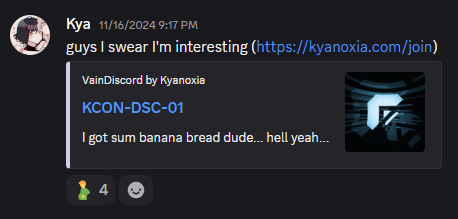\n\nSo what we have now is an expandable embedding solution for a vanity link on your domain. You can disable `create invites` for everyone in your server, and only use that single URL. Easy to remember, easy to manage, easy to create. To check out more, check the source code of my website on my [GitHub](https://github.com/kyanoxia/kyanet).",
"createdAt": "2025-03-02T22:47:58.957Z",
"visibility": "public"
}