{
"$type": "com.whtwnd.blog.entry",
"blobs": [
{
"name": "Screenshot 2024-11-03 at 19.32.35.png",
"blobref": {
"ref": {
"code": 85,
"version": 1,
"hash": {
"0": 18,
"1": 32,
"2": 101,
"3": 210,
"4": 213,
"5": 178,
"6": 15,
"7": 73,
"8": 118,
"9": 3,
"10": 71,
"11": 137,
"12": 183,
"13": 134,
"14": 252,
"15": 124,
"16": 100,
"17": 52,
"18": 205,
"19": 48,
"20": 238,
"21": 132,
"22": 131,
"23": 188,
"24": 186,
"25": 176,
"26": 120,
"27": 55,
"28": 50,
"29": 242,
"30": 58,
"31": 16,
"32": 252,
"33": 86
}
},
"size": 66250,
"mimeType": "image/png",
"original": {
"$type": "blob",
"ref": {
"$link": "bafkreidf2lk3ed2joybupcnxq36hyzbuzuyo5bedxs5la6bxglzdueh4ky"
},
"mimeType": "image/png",
"size": 66250
}
},
"encoding": "image/png"
}
],
"theme": "github-light",
"title": "Setting up my new dedicated server at Hetzner",
"content": "# Setting up my new dedicated server at Hetzner\n\nMostly notes to self.\n\nWe're using Debian 12, because it's what I'm most comfortable with and, more importantly, it's boring and sta—\n\n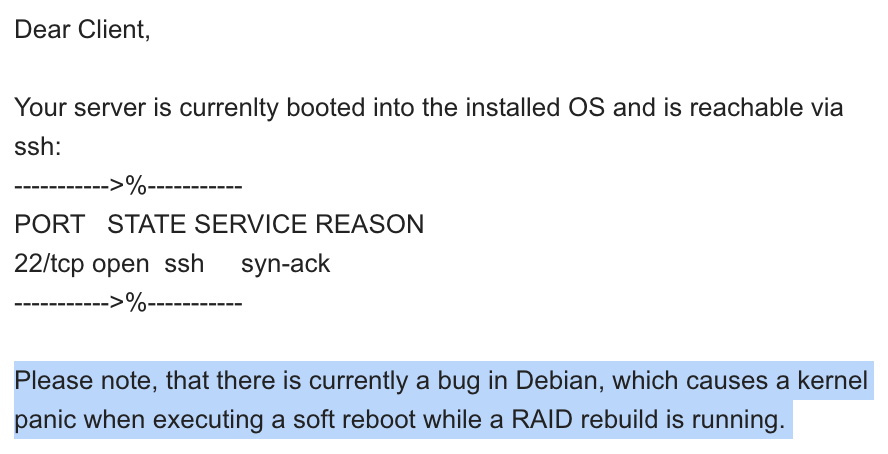\n\nVery cool.\n\n## History\n\nFirst thing we do is set eternal history:\n\n```bash\n# Eternal bash history.\n# ---------------------\n# Undocumented feature which sets the size to \"unlimited\".\n# http://stackoverflow.com/questions/9457233/unlimited-bash-history\nexport HISTFILESIZE=\nexport HISTSIZE=\nexport HISTTIMEFORMAT=\"[%F %T] \"\n# Change the file location because certain bash sessions truncate .bash_history file upon close.\n# http://superuser.com/questions/575479/bash-history-truncated-to-500-lines-on-each-login\nexport HISTFILE=~/.bash_eternal_history\n# Force prompt to write history after every command.\n# http://superuser.com/questions/20900/bash-history-loss\nPROMPT_COMMAND=\"history -a; $PROMPT_COMMAND\"\n```\n\nLog out, log in, off we go.\n\n## The basics\n\nSet the hostname:\n\n```bash\nhostnamectl set-hostname big.bsky.sh\nvi /etc/hosts\nhostnamectl\n```\n\nThere is only ever one timezone:\n```bash\ntimedatectl set-timezone UTC\n```\n\nEnable backports (Debian only):\n```bash\nvi /etc/apt/sources.list\n```\n\nVarious tweaks:\n```bash\necho '* soft nofile 10000000' >> /etc/security/limits.conf\necho '* hard nofile 10000000' >> /etc/security/limits.conf\necho 'fs.file-max=10000000' >> /etc/sysctl.conf\necho 'vm.swappiness=10' >> /etc/sysctl.conf\necho 'kernel.panic=1' >> /etc/sysctl.conf\n\n# Debian only\nvi /etc/default/grub\nGRUB_TIMEOUT=3\nupdate-grub\n```\n\nInstall the latest kernel (Debian only):\n```bash\napt install -t bookworm-backports linux-image-amd64 linux-headers-amd64\n```\n\nInstall all the packages:\n```bash\napt -y install sudo git mosh btop tmux build-essential unzip vim ncdu less curl sqlite3 htop python3.11-dev python3.11-full gnupg apt-transport-https lsb-release wget postgresql-common\napt -y install sudo git mosh btop tmux build-essential unzip vim ncdu less curl sqlite3 htop python3.12-dev python3.12-full gnupg apt-transport-https lsb-release wget postgresql-common\n\n```\n\nInstall Postgres:\n```bash\n/usr/share/postgresql-common/pgdg/apt.postgresql.org.sh\napt install postgresql-server-dev-16 libpq-dev postgresql-16 postgresql-client-16\n```\n\nRecreate the default DB cluster with sensible defaults:\n```bash\nsystemctl stop postgresql\npg_dropcluster 16 main --stop\npg_createcluster 16 main --start -- -E UTF8 --no-locale -n\nsystemctl start postgresql.service\n```\n\nInstall Timescale:\n```bash\necho \"deb https://packagecloud.io/timescale/timescaledb/ubuntu/ $(lsb_release -c -s) main\" | sudo tee /etc/apt/sources.list.d/timescaledb.list\nwget --quiet -O - https://packagecloud.io/timescale/timescaledb/gpgkey | sudo gpg --dearmor -o /etc/apt/trusted.gpg.d/timescaledb.gpg\napt update\napt install timescaledb-2-postgresql-16 timescaledb-tools\ntimescaledb-tune --quiet --yes\nsystemctl restart postgresql.service\n```\n\nOther useful tools:\n```bash\n# Rust\ncurl --proto '=https' --tlsv1.2 -sSf https://sh.rustup.rs | sh -s -- -y\n. \"$HOME/.cargo/env\"\n# fnm\ncurl -fsSL https://fnm.vercel.app/install | bash\nsource /root/.bashrc\nfnm install --lts\n# Bun\ncurl -fsSL https://bun.sh/install | bash\nsource /root/.bashrc\n# uv\ncurl -LsSf https://astral.sh/uv/install.sh | sh\n```\n\nMore tweaks:\n```\nsystemctl set-default multi-user.target\nsystemctl mask graphical.target\n\nsystemctl edit postgresql@16-main.service\n\n[Unit]\nAfter=network.target\n```\n\nCheck on the disks:\n```bash\nsmartctl -a /dev/nvme0n1\nsmartctl -a /dev/nvme1n1\n# ```\n",
"createdAt": "2024-11-04T00:39:31.114Z",
"visibility": "author"
}